Kling 4.0 adds longer generation, multiple keyframes, and expanded references. But do these upgrades produce more usable videos?
This review examines portraits, long takes, action scenes, and reference-driven projects, focusing on test conditions, visible strengths, practical limitations, and creative techniques.
TL;DR
Detail and atmosphere need separate checks. Sharp skin texture does not guarantee natural characters or the right filming style.
Longer clips work best around a clear event. Actions, camera paths, and endings need deliberate planning.
Visual anchors improve direction, not certainty. Keyframes and references still require continuity checks.
Complex scenes need precise direction. Specify camera movement, character interactions, and transitions to compensate for Kling 4.0’s limited autonomous scene planning.
Visual Quality: Detail Meets Cinematic Style
Judge the complete image, not just its sharpness.
The portrait test used matching prompts, reference subjects, and resolution at 720p. A separate 30-second Vlog tested lighting, character appearance, camera movement, and a DV-style finish.
Test | Kling 4.0 result | What it means |
Portrait realism | Finer skin and lip detail; Seedance’s overall character appeared more natural | Texture fidelity and naturalness are different qualities |
DV-style Vlog | Clear footage, but a weaker match to the intended DV mood than Seedance | More clarity is not always a better stylistic fit |
Assessment:
Kling 4.0 video quality is promising for detailed imagery, but these examples do not establish a universal realism winner.
💡 Creative Tips:
Specify lighting and capture texture alongside the subject: soft window light, restrained handheld movement, or subtle consumer-camera texture.
30-Second Scenes: Can the Story Hold Together?
Give the extra time a clear purpose.
Two tests challenged continuity:
City pursuit:
Character and city references guided a tracking shot longer than 20 seconds, including running, a fruit-stall collision, and street obstacles.
Circus long take:
A text-only 30-second sequence combined a camera dive, curtains, a magician, birds, and changes between normal speed and slow motion.
What worked:
The pursuit connected running with environmental interaction. A box deforming beneath the character’s weight showed a convincing moment of contact response. The circus sequence brought several events and camera demands into an extended scene.
Assessment:
Longer generation can support a developed event. Individual interactions and the ending still need checking; one convincing collision does not prove reliable physics throughout.
💡 Creative Tips:
Build an opening → main event → finish, connected by a clear route.
For a continuous shot, describe the camera’s journey. Selecting 30 seconds does not automatically prevent cuts.
Action and Camera Motion: Do They Work Together?
Clear choreography makes speed useful.
Two different movement tasks tested Kling 4.0 motion quality:
Elevator fight:
References and a detailed prompt specified a dodge, wrist grab, counterattack, collision, and escape. The resulting action chain worked with close tracking and lateral camera movement.
Figure skating:
Acceleration, stopping, jumping, and rotation tested balance and transitions. Body alignment and movement after landing were strengths in this example.
Assessment:
Check three things: action logic, contact weight, and camera readability.
💡 Creative Tips:
Replace “an intense fight” with a sequence of actions. Give the camera a specific job during each phase rather than asking for several competing movements.
Keyframe Control: Can the Story Stay on Track?
Plan the important moments, then inspect the connections.
The keyframe tests used two distinct sequences:
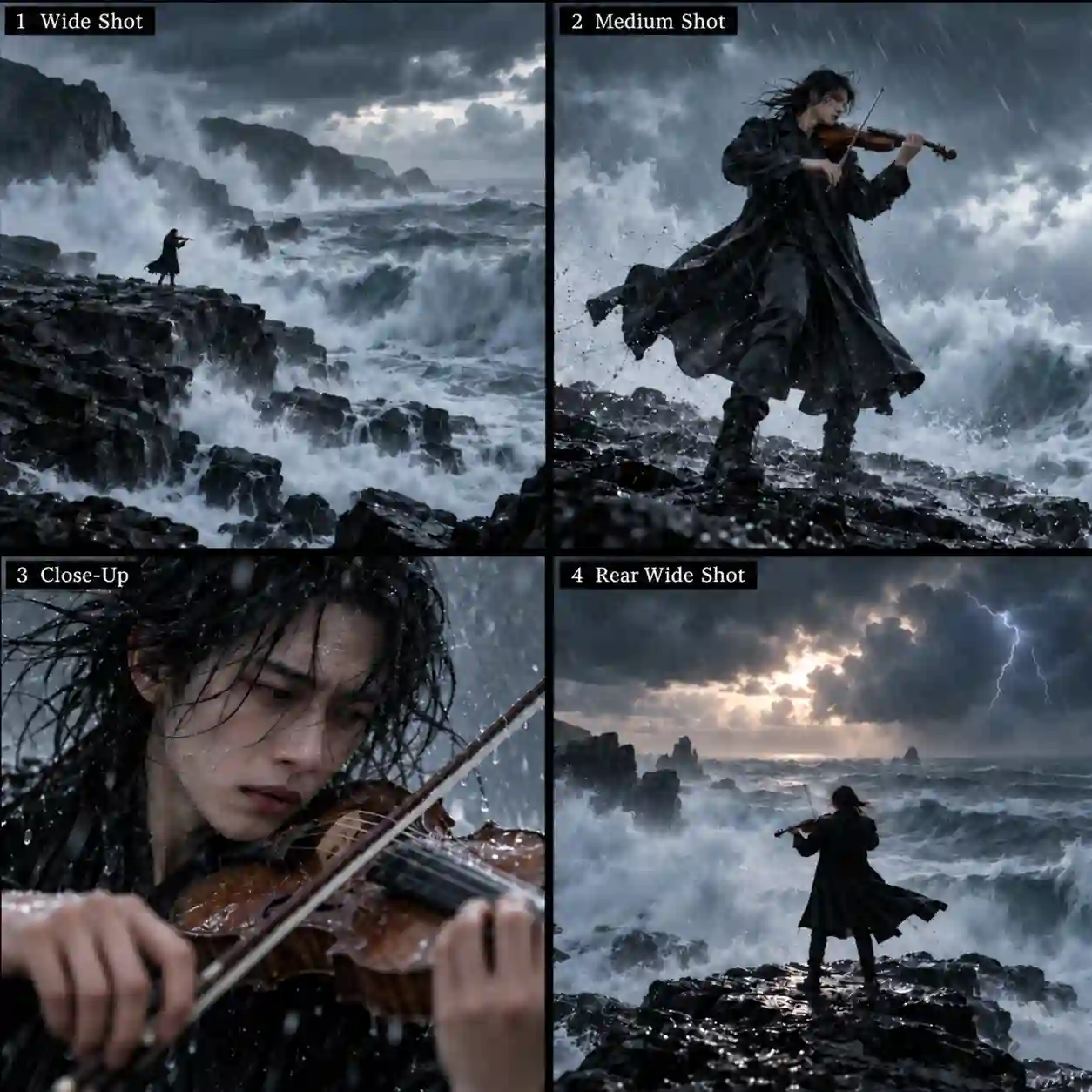
Stormy-coast violin performance
Wide coast → medium performance → close-up → rear wide shot.
Office-to-nature transition
Person at a desk → cabin on a monitor → cabin exterior → mountain river.
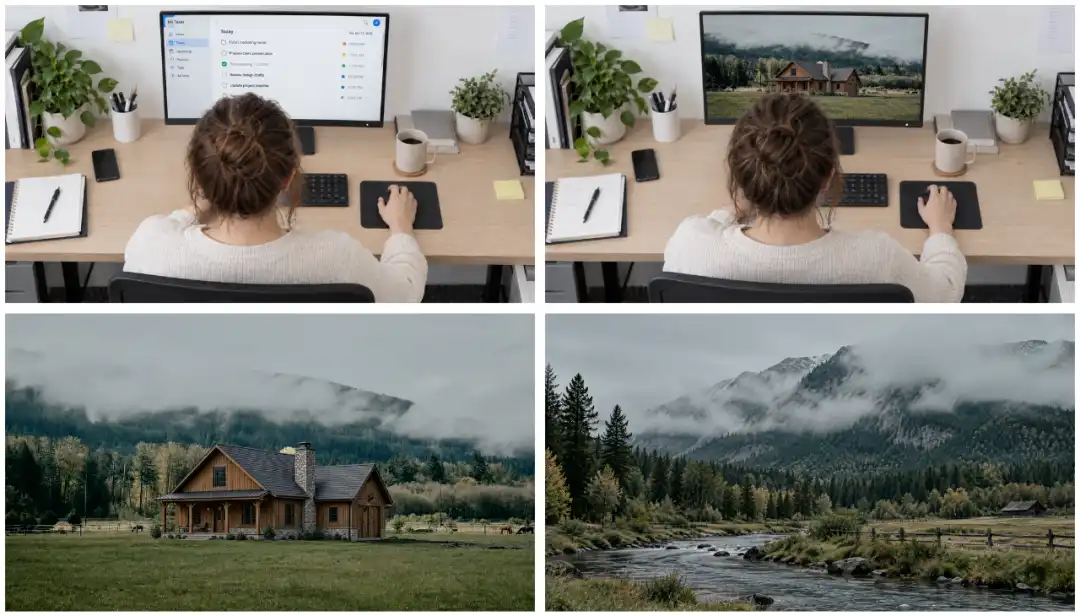
The violin sequence closely followed its key compositions and filled in the progression between views. The office sequence connected an everyday setting with an imagined destination.
Assessment:
Kling 4.0 keyframes help preserve planned visual moments. A successful result also needs coherent identity, space, and movement between them.
💡 Creative Tips:
Keep character design, clothing, and lighting compatible.
Give every frame a necessary narrative or visual role.
Use the frames you need; ten available keyframes are not a target.
Omni Reference: How Well Does It Use Your Sources?
Assign each input one clear responsibility.
A depth-video dance test examined movement adherence.
A more elaborate robot setup separated the creative requirements:
Input | Assigned role |
Reference video | Camera movement and shot pacing |
Stone-tower image | New environment |
Robot images | Character appearance and expressions |
Prompt | Change from sad to happy when a butterfly lands |
The robot setup separates camera guidance from character appearance and the trigger for an expression change.
Assessment:
Following movement and coordinating multiple creative requirements are separate tests.
💡 Creative Tips:
State both what each asset contributes and what should change.
Choose Keyframes for planned visual moments or Omni Reference for broader asset guidance; do not assume both entries can be combined in one task.
Kling 4.0 Limits: Needs More Creative Direction
Complex scenes demand explicit staging.
Compared with Seedance 2.5, Kling 4.0 can follow the events described in a prompt but may need more explicit direction to make them feel naturally staged and connected.
Area | Where Kling 4.0 can fall short |
Camera direction | Movement can feel rigid, with less expressive framing and less purposeful camera choreography. |
Narrative staging | Events may happen as requested, while character positions, movement paths, and interactions lack natural coordination. Transitions can feel disconnected. |
Motion realism | Actions can become exaggerated, reducing the sense of believable weight and physical behavior. |
Assessment:
The main limitation is weaker autonomous scene planning. Completing individual instructions does not guarantee a coherent sequence with convincing movement and interaction.
💡 Creative Tips:
For longer narratives or complex interactions, define character positions, movement routes, interaction order, camera behavior, and transitions precisely.
Give Kling 4.0 a clear scene plan rather than relying on it to design the staging and connections independently.
The Verdict: Where Kling 4.0 Fits Your Workflow
Match the model to a concrete creative task.
Kling 4.0 is worth exploring for:
Planned narrative scenes: Use keyframes to define important compositions, then check the transitions.
Action and sports footage: Test connected movements and camera direction; inspect balance and contact.
Longer scenes: Give an event room to develop, with a clear route and finish.
Reference-driven projects: Separate appearance, setting, movement, and camera requirements.
The practical verdict:
Kling 4.0 offers useful detail and scene control, but clear planning and output review remain essential.
Start with one action or a few compatible keyframes, then refine against your plan.
Kling 4.0 Review FAQs
Do more reference images always improve the result?
No. Conflicting inputs can make direction less clear. Add a reference only when it supplies a distinct requirement.
Should I reuse a prompt written for another video model?
Use it as a starting point, then adapt asset roles, action order, and camera instructions. A shared-prompt comparison and an optimized workflow answer different questions.
What should I record when comparing AI video outputs?
Save the prompt, assets, model mode, resolution, duration, aspect ratio, and attempt count. Keep initial outputs alongside revisions so recurring problems remain visible.